

Online Rent Collection Made Simple
- Set up rent payments
- Invite tenants
- Collect payments online
- Get paid to your bank account
- Monitor every transaction
Table of Contents
Imagine a world where rent collection hassle is automated. You don’t need to chase tenants, manually prepare invoices, and create tracking spreadsheets. That’s exactly what you get when you connect bank account to Royalinvest.ca and collect rent with it.
With this connection, collecting rent becomes fast, secure, and effortless. Payments go straight to your bank account, and everything is neatly tracked in your dashboard.
In this step-by-step guide, we’ll show you how to:
- Verify your personal details
- Add your business information
- Review and submit your account
- Start collecting rent online
By the end of this guide, you’ll have a fully connected account and a smooth, automated rent collection system, making rent one less thing to worry about each month.
What You Need Before You Start
Before diving into connecting, it’s helpful to have everything ready, so the setup goes smoothly. This section sets expectations and reduces mistakes or delays.
You should include:
- Royalinvest.ca account: Make sure you’re logged in and have access to your dashboard.
- Personal information: Full legal name, date of birth, phone number, address, and email.
- Bank account details: Account number, transit/routing number, and account holder name for payouts.
- Business information (if applicable): business name, website, and registration details.
- Government-issued ID: Needed to identity verification.
Steep 1: Verify Your Personal Data
Once you start the set-up process, you’ll be redirected to the page where you need to verify your personal details. Those are:
- Your full legal name
- Email address
- Job Title
- Date of birth
- Home address (Country, province, city, street, and apartment)
- Postal code
- Phone number
Important Tips
- Make sure all information matches your official documents.
- Avoid using nicknames or shortened names.
- Double-check your address for accuracy.
Providing accurate details helps prevent delays in verification and ensures your account is approved smoothly.
Once completed, click Continue to move to the next step.
Step 2: Provide Your Business Details
After verifying your personal details, you will be asked for information about how you earn or collect money using Royalinvest.ca.
This step helps us understand your activity and complete compliance checks.
You’ll need to complete the following fields:
Industry: Select the option that best matches your activity. As you are collecting rent through Royalinvest.ca, choose a category related to property, or real estate services, whichever most accurately reflects your situation.
Website: Enter the website where you promote or manage your rental activity. Make sure the website is active and clearly shows that you offer rental services. Generic or incomplete websites may cause delays in approval.
Product Description: You also need to fill out a short 2–3 sentence explanation of your activity.
Here’s a sample you can use:
“I use Royalinvest.ca to manage rental properties and collect monthly rent payments from tenants. Tenants receive payment requests through the platform and pay securely online. Payments are processed electronically and deposited into my connected bank account.”
Keep your description simple and accurate. Briefly explain:
- What service you provide
- How tenants interact with you
- How payments are collected
Once all fields are completed, click Continue to proceed to the next step.
Step 3: Review and Submit Your Information
Before completing the setup, you will see a summary page where you can review all the information you’ve entered. This is your opportunity to double-check everything before submitting.
You’ll see a breakdown of:
- Business type (for example: Individual or Sole Proprietorship)
- Location
- Website
- Product description
- Personal details
- Payout details (bank account information)
If any section is marked Incomplete, click Edit and finish providing the required details. You can not submit the form until all required sections are completed.
Pay special attention to:
- Your full legal name
- Your website link
- Your product description
- Your bank account details
Incorrect or missing information may delay approval or payouts.
Why Connecting Bank Account Is Secure and Trusted Worldwide
When you connect bank account to Royalinvest.ca, you’re using one of the most secure payment systems available.
Payment systems follow the highest security standards in the industry. All payment data is encrypted both in transit and at rest, ensuring it remains protected at every stage. Card numbers are secured using AES-256 encryption and tokenization, meaning full details are never exposed. Bank account information is protected with the same level of security
The platform also includes strong account protection features such as multi-factor authentication (MFA), login monitoring, security alerts, and detailed audit logs. Its systems are regularly audited under SOC 1 and SOC 2 Type II standards and follow leading cybersecurity frameworks to ensure a high level of security and reliability.
For Royalinvest.ca users, this means your tenants’ payment information is protected, and your payouts are securely deposited into your bank account, giving you a safe and reliable rent collection system.
Taking a few minutes to connect bank account to Royalinvest.ca can completely change how you collect rent.
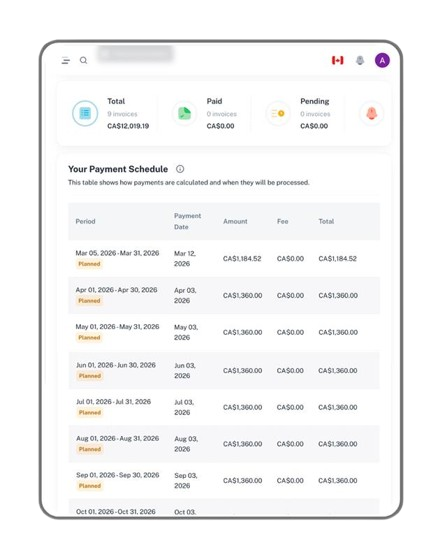
Instead of chasing payments, sending reminders, and manually tracking deposits, you’ll have an automated system that handles everything in one place. Payments are processed securely, deposited directly into your bank account, and tracked inside your dashboard.
It’s faster for you. It’s easier for your tenants. And it adds a professional layer to your rental business.
If you’re ready to simplify rent collection and reduce monthly stress, now is the time to connect to Royalinvest.ca and start accepting rent payments online.
Also, read:
- Rent collection 101: Tactful Ways to Remind Tenants About Upcoming Rent Without Being Pushy
- From Invoice to Payment: Streamlining the Rent Collection Workflow
- Questions To Ask Tenants Before Credit Check
FAQs
How long does it take to get approved after I connect bank account to Royalinvest.ca?
Approval usually happens quickly, often within minutes. However, sometimes it can take a few business days. Providing accurate personal, business, and bank information during setup helps avoid delays and ensures your account is ready to start collecting rent smoothly.
Can I use rent collection if I only manage one rental property?
Yes, it works for landlords managing a single property or multiple units. Connecting to Royalinvest.ca allows you to collect rent online for any number of properties. Even small-scale landlords benefit from automation, secure payments, and simplified tracking, making rent collection faster and more professional.
What payment methods can a tenant use?
Tenants can pay using debit or credit or debit cards, and bank transfers. Payments are processed securely and deposited directly into your connected bank account. Using Royalinvest.ca ensures tenants have a reliable, easy way to pay while keeping your income safe and properly tracked.
What happens if a tenant’s payment fails?
If a payment fails due to insufficient funds or a declined card, the transaction will not go through. You will be notified in your Royalinvest.ca dashboard, so you can follow up promptly. This feature reduces the need for manual tracking and helps you manage late or failed payments efficiently.
Can I disconnect or update my account later?
Yes, you can update your bank account, change payout details, or disconnect your account whenever necessary. This flexibility ensures your payment system grows with your rental business. You can manage your account through Royalinvest.ca at any time without interrupting ongoing rent collection or affecting tenants’ payment experience.




Leave a Reply